

















A Steam Gift Card is usually easy to redeem, but sometimes the code does not work as expected. You may see an error message saying the Steam Wallet Code is invalid, already redeemed, not activated, or not available in your region. This can be frustrating, especially if you bought the code online and expected to add the balance to your Steam Wallet quickly.
The good news is that most Steam Gift Card problems come from a few common causes. In many cases, the issue is related to a typing mistake, region mismatch, delayed activation, or an account-related problem. This guide explains why your Steam Gift Card code may not be working and what you can do to fix it.
First, Check That You Are Redeeming the Right Type of Code
Before troubleshooting, make sure you are using the correct redemption page. A Steam Gift Card or Steam Wallet Code is different from a Steam game key. A wallet code adds balance to your Steam Wallet, while a game key activates a specific game or software product.
If you enter a wallet code in the wrong place, or try to redeem a game key as wallet credit, it may not work. Go to the Steam Wallet Code redemption page and enter the code there. If you are trying to activate a game key, use Steam’s product activation option instead. (How to Redeem Steam Gift Card?)
Reason 1: The Steam Gift Card Code Was Entered Incorrectly
The most common reason a Steam Gift Card code does not work is simple input error. Steam Wallet Codes usually contain letters and numbers, and some characters can look very similar.
Common mistakes include confusing:
O and 0
I and 1
B and 8
S and 5
G and 6
If you received your Steam code by email, copy and paste it directly into the redemption box. Make sure there are no extra spaces before or after the code. If you are typing the code manually from a card or screenshot, check every character carefully.
Also make sure you are not mixing up multiple codes from different orders. If you bought more than one Steam Gift Card, label each code clearly and redeem them one by one.
Reason 2: The Steam Wallet Code Is Invalid
If Steam says the code is invalid, it usually means the code format is not recognized or the code is not accepted by Steam. This can happen if the code was typed incorrectly, copied incompletely, damaged, or issued for another product.
An invalid code error can also happen if the seller gave the wrong code type. For example, you may have received a game key, promotional code, or non-Steam product code instead of a Steam Wallet Code.
To fix this, compare the code with the original delivery email or product information. Confirm that the product title says Steam Gift Card, Steam Wallet Code, or Steam digital code. If the code still appears invalid, contact the seller and provide your order number and the error message. Do not post your full code publicly.
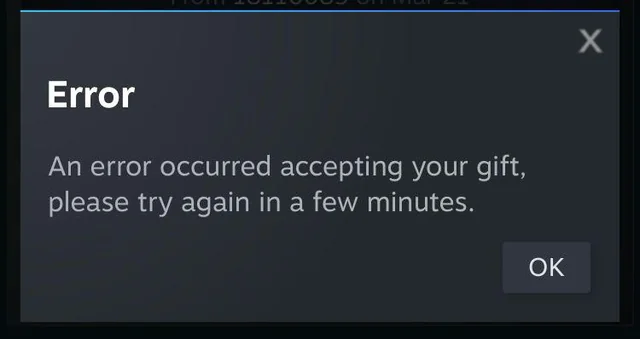
Reason 3: The Steam Gift Card Code Has Already Been Redeemed
If Steam says the code has already been redeemed, the code has likely been used before. Steam Wallet Codes are normally single-use. Once redeemed, the balance is added to one Steam account and the same code cannot be used again.
Before assuming the code was used by someone else, check whether you may have redeemed it on another Steam account. Many users have more than one Steam account and accidentally log into the wrong one. Check your other accounts and review wallet balance changes if possible.
If you are sure you did not redeem the code, contact the seller as soon as possible. Provide your order details, the delivery time, and the exact error message. A trusted seller should be able to investigate whether the code was delivered correctly or whether there was a fulfillment issue.
Reason 4: The Steam Gift Card Region Does Not Match Your Account
Region mismatch is one of the most important issues with Steam Gift Cards. Steam accounts have a store country and wallet currency. If the Steam Gift Card you bought is issued for a different region or currency, the code may fail or may not be suitable for your account.
For example, if your Steam account is based in New Zealand, a Steam Gift Card listed for another region may not always be the safest choice. Some codes may convert into your Steam Wallet currency, but region restrictions and account rules can still affect redemption.
Before buying, always check the product title and region notice. Look for details such as United States Region, New Zealand Region, Europe Region, Global Region, USD, NZD, or EUR. If you are unsure, choose a Steam Gift Card that matches your Steam account country or wallet currency.
Reason 5: The Code Has Not Been Activated Yet
Sometimes a Steam Gift Card code is valid, but it has not been activated properly by the seller or retail system. This is more common with physical cards, but delayed activation can also affect some digital orders depending on how the seller processes the code.
If Steam shows an activation-related error, wait for a short period and try again later. The code may need time to become active after purchase. If the issue continues, contact the seller and ask them to check whether the Steam Gift Card was properly activated before delivery.
When contacting support, include your order number, purchase date, product name, and the error message you see on Steam. This helps the support team check your order faster.
Reason 6: Steam Is Temporarily Busy or Having a Service Issue
In some cases, the Steam Gift Card code is fine, but Steam’s system may be temporarily busy. Redemption pages, account services, or payment systems can occasionally experience delays or temporary errors.
If the code looks correct and you believe the region is right, wait and try again later. You can also try redeeming the code through a different method, such as using the Steam client instead of a browser, or using a browser instead of the Steam client.
Avoid repeatedly entering the code too many times in a short period. If Steam is temporarily unavailable, repeated attempts may not help and can make troubleshooting more confusing.
Reason 7: You Are Logged Into the Wrong Steam Account
Another common mistake is redeeming or trying to redeem the code on the wrong Steam account. If you manage multiple Steam accounts, you may be logged into an old account, family account, or secondary account without noticing.
Before entering your Steam Wallet Code, check your account name and account details. Make sure it is the account where you want the balance to appear. Once a Steam Gift Card is redeemed, the balance is attached to that account and normally cannot be transferred to another account.
If you think you redeemed the code on the wrong account, check that account’s Steam Wallet balance and purchase history.
Reason 8: The Seller Sent the Wrong Region or Wrong Product
If you bought your Steam Gift Card online and the code does not work, review the product page and order confirmation carefully. Sometimes buyers accidentally purchase the wrong region. In other cases, the seller may deliver the wrong product, wrong value, or wrong currency.
Check the product title, region, currency, face value, and delivery email. If anything does not match your order, contact the seller immediately. A clear screenshot of the order details and the Steam error message can help support investigate the issue.
How to Fix a Steam Gift Card Code That Is Not Working
Start with the easiest checks first. Re-enter the code carefully, preferably by copying and pasting it from the original delivery email. Remove any spaces before or after the code.
Next, confirm that you are using the Steam Wallet Code redemption page, not the game activation page. Then check that you are logged into the correct Steam account.
After that, review the card region and currency. If the region does not match your Steam account, the code may not be suitable for your account. In this case, contact the seller instead of trying to force the redemption.
If Steam says the code is already redeemed, check your other Steam accounts. If you still cannot find the balance, contact the seller and provide your order details.
If Steam says the code is not activated, wait for a while and try again. If it still fails, contact the seller and ask them to verify activation.
If none of these steps work, contact Steam Support for account-specific help. The seller can help with delivery, activation, and order issues, while Steam Support may be needed for account or redemption system issues.
How to Avoid Steam Gift Card Problems in the Future
The best way to avoid Steam Gift Card problems is to buy the correct region from a trusted seller. Read the product title carefully before checkout and make sure the currency matches your Steam account.
Do not buy Steam codes from unknown social media sellers, random private messages, or suspicious marketplaces. A very cheap code may be already used, region locked, or not properly activated.
Keep your order confirmation and delivery email until the code is redeemed successfully. If you are buying as a gift, remind the recipient to redeem the code on the correct Steam account and to keep the code private.
Also remember that Steam Gift Cards should only be used on Steam. If someone asks you to pay a bill, tax, delivery fee, account problem, or service charge using a Steam Gift Card, it is likely a scam.
FAQs About Steam Gift Card Codes Not Working
Why is my Steam Gift Card code not working?
Your Steam Gift Card code may not work because it was entered incorrectly, already redeemed, not activated properly, restricted by region, or affected by a temporary Steam issue. Check the code, account, region, and redemption page first.
What should I do if Steam says my code is invalid?
Recheck every character in the code and make sure you are redeeming it on the Steam Wallet Code page. If the code still appears invalid, contact the seller with your order number and the error message.
What does it mean if my Steam code has already been redeemed?
It means the code has already been used on a Steam account. Check whether you redeemed it on another account. If not, contact the seller and ask them to investigate the order.
Can a Steam Gift Card fail because of region mismatch?
Yes. A Steam Gift Card may fail if the code region or currency is not compatible with your Steam account’s store country or wallet currency. Always check the region before buying.
Why does Steam say my code is not activated?
This may mean the code has not been properly activated by the seller or retail system. Wait and try again later. If the issue continues, contact the seller to verify activation.
Can I redeem a Steam Gift Card from another country?
It depends on the code, currency, region, and your Steam account. Some codes may convert, but region restrictions can still apply. The safest choice is a Steam Gift Card that matches your account region.
Can I get a refund if my Steam Gift Card does not work?
Refund rules depend on the seller and whether the code has been revealed or redeemed. Contact the seller with your order number and Steam error message as soon as possible.
Should I share my Steam Wallet Code with support?
Only share code details through an official or secure support channel when necessary. Never post your full Steam Wallet Code publicly in forums, comments, or social media.
How can I prevent Steam Gift Card errors?
Buy from a trusted seller, choose the correct region, check your email address, redeem on the correct Steam account, and keep your order confirmation until the balance appears in your Steam Wallet.